

Private AI, Built For Your Business

Run powerful LLMs, vision models, transcription, and automations fully offline — on hardware you own and control. 

Private AI, Built For Your Business.

Run powerful LLMs, vision models, transcription, and automations fully offline — on hardware you own and control.

No Cloud. No API Calls. Full Compliance.

XR Private AI Server

AI That Never Leaves Your Premises

Your Data. Your Hardware.

Zero data leaves your office. [cite_start]Full control and immediate compliance for medical, legal, and financial records. [cite: 543]

Predictable Costs

No per-user fees. No usage limits. [cite_start]Replace variable cloud subscriptions with a fixed, owned asset. [cite: 541]

Instant Local Speed

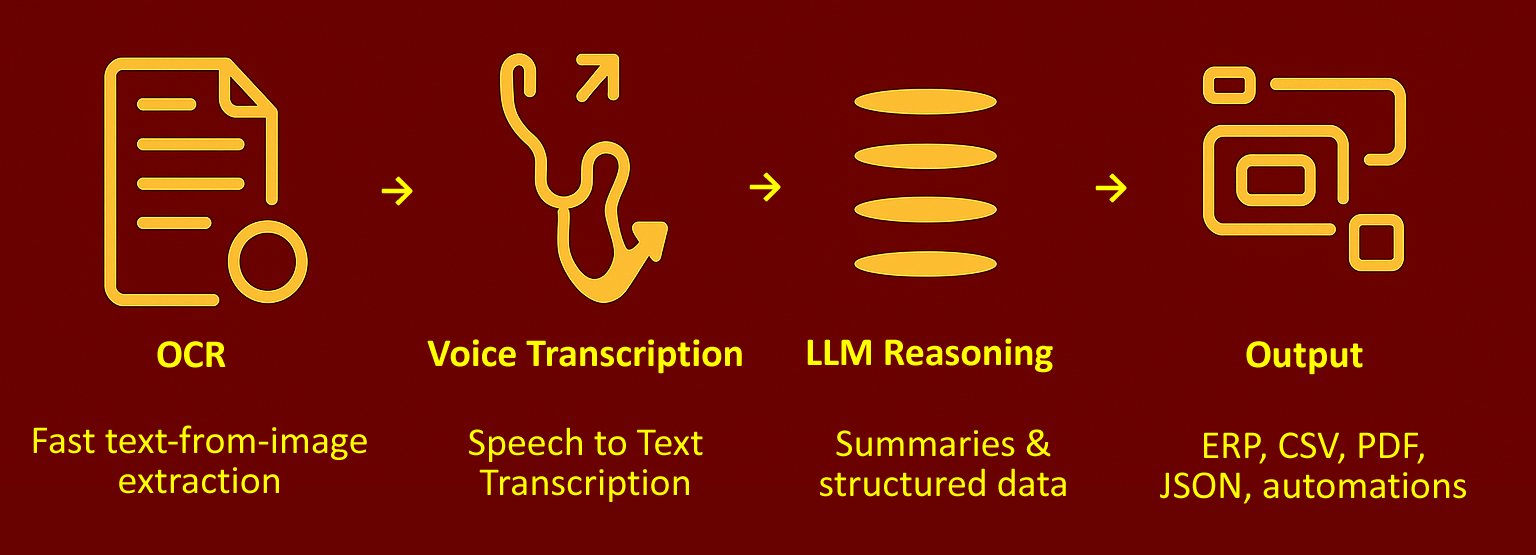
LLMs, Whisper, OCR, and vision models run at LAN speed without internet dependency.

Built For Regulated Industries

⚖️ Legal Firms

[cite_start]

Recover 1+ billable hour per attorney per day. Automate transcription, summarize case files securely, and create first drafts without uploading client data to the cloud. [cite: 628, 657]

⚕️ Medical Practices

Save 1-2 hours per provider daily. Dictate notes once and let the system generate structured records locally. [cite_start]No patient data ever leaves the premises. [cite: 616, 645]

📊 Accounting

[cite_start]

Eliminate 50-70% of manual data entry. Process bulk receipts and statements overnight so your staff starts the day with review-ready results. [cite: 636, 671]

Your Entire AI Workflow, Automated

[cite_start]

XR is not a chatbot—it is a workflow engine that turns voice and documents into structured records. [cite: 753]

1. Automated Document Intake

Turn client submissions into review-ready data. Whether it's receipts, forms, or intake documents, XR extracts key data and files it in your system automatically.

2. Private Voice Transcription

Convert calls, meetings, and consults into structured notes. We don't just transcribe; we extract action items and save them to the correct client record.

3. Firm Knowledge Assistant

Stop searching shared folders. Ask questions and get answers based *only* on your approved internal documents and SOPs, complete with source citations.

4. Overnight Batch Processing

Clear backlogs while you sleep. Process large batches of documents outside business hours to handle peak workloads without adding staff.

Choose Your Deployment

XR GPU Mobile

Portable All-in-One System

5-10 Concurrent Users

A private, offline system you can put on a desk. [cite_start]Ideal for small teams and clinics. [cite: 571]

XR GPU Server

Production AI System

10-50+ Concurrent Users

Replaces multiple cloud subscriptions for the entire office. [cite_start]High volume processing. [cite: 588]

Custom Deployment

Bring Your Own Hardware

Sized per deployment

Have existing GPUs? [cite_start]We can install and certify the XR AI stack on your approved hardware. [cite: 603]

Stop Renting AI. Start Building Assets.

Request a demo and ROI analysis to see how much you can save.
XR Enterprises

[cite_start]

Suite 1316, 13th Floor, No. 663 Jiu Jiang Road, Huangpu District, Shanghai [cite: 764]

Contact: Support@XR-Enterprises.com

© 2025 XR Enterprises. All Rights Reserved.


AI That Never Leaves Your Premises

← Back to Home

AI Workflow Menu

All workflows run securely on your private system and can be used individually or combined. [cite: 3]

Phase 1: Immediate ROI (Start Here)

These workflows require minimal setup and deliver the fastest payback period (weeks to months). [cite: 168]

1. Automated Document Intake

ROI: ★★★★★ [cite: 176] Effort: ★★☆☆☆ [cite: 177]

What it does: Turn client submissions into review-ready data. Clients send documents or receipts, and the system extracts key data, organizes it, and prepares it for staff review. [cite: 12-14]

Client Submits AI Extraction Organize & Validate Review-Ready Data [cite: 19-33]

Best For:

Receipts, intake forms, statements, invoices. [cite: 15]

Impact:

Eliminates manual data entry and reduces back-and-forth. [cite: 16]

2. Automated Notes & Documentation

ROI: ★★★★☆ [cite: 181] Effort: ★★★☆☆ [cite: 182]

What it does: Calls, meetings, or visits are transcribed and converted into clean, structured notes saved directly to the correct client record. [cite: 36]

Conversation Record & Transcribe AI Documentation Structured Record [cite: 50-55]

Best For:

Client calls, medical consultations, visits, interviews. [cite: 37]

Impact:

Saves after-hours work and improves documentation quality. [cite: 38]

3. Automated Client Follow-Ups

ROI: ★★★★☆ [cite: 184] Effort: ★★★☆☆ [cite: 185]

What it does: Nothing falls through the cracks. Client emails or conversations automatically generate follow-up lists, missing-item checklists, and internal tasks. [cite: 57, 58]

Emails/Conversations Gather Missing Items Automated Follow-Ups Assign Tasks [cite: 70-74]

Best For:

Onboarding, missing documents, engagement tracking. [cite: 59]

Impact:

Faster completion, fewer delays, clearer ownership. [cite: 59]

Phase 2: Scale & Leverage

Designed to handle volume and preserve institutional knowledge. [cite: 168]

4. Overnight Document Processing

ROI: ★★★★☆ [cite: 188] Effort: ★★★☆☆ [cite: 189]

What it does: Clear backlogs while you sleep. Large batches of documents are processed outside business hours so staff starts the day with review-ready results. [cite: 77, 78]

Document Backlogs Collect & Prioritize Process Overnight Review-Ready Data [cite: 90-93]

Best For:

Busy seasons, backlog cleanup, bulk intake. [cite: 79]

Impact:

Handles peak workloads without adding staff. [cite: 79]

5. Firm Knowledge Assistant

ROI: ★★★☆☆ [cite: 191] Effort: ★★☆☆☆ [cite: 192]

What it does: Staff can ask questions and get answers based *only* on your approved internal documents, with source references. [cite: 97]

Staff Question Secure Lookup Verified Sources Cited Answer [cite: 114-120]

Best For:

SOPs, prior cases, policies, onboarding new staff. [cite: 98]

Impact:

Fewer interruptions to senior staff, consistent answers. [cite: 99]

Phase 3: Speed & Output

Advanced tools to accelerate complex review and drafting tasks. [cite: 168]

6. Live Document Review

What it does: Ask your documents instead of reading them. Review contracts or case files through live Q&A that surfaces relevant sections instantly. [cite: 122, 123]

Review Documents Ask Questions Surface Answers Highlight Text [cite: 139-144]

Best For:

Long documents, case files, quality reviews. [cite: 124]

Impact:

Faster reviews, better accuracy, less re-reading. [cite: 125]

7. First-Draft Generator

ROI: ★★★★☆ [cite: 197] Effort: ★★★★☆ [cite: 198]

What it does: Never start from a blank page again. Repetitive documents and summaries are generated as review-ready first drafts using existing data. [cite: 146, 147]

Repetitive Needs Gather Data Generate Drafts Ready for Review [cite: 161-165]

Best For:

Summaries, letters, reports, internal memos. [cite: 148]

Impact:

Saves writing time, improves consistency. [cite: 148]

Build Your Custom Workflow

We configure these workflows to fit your specific firm's needs.

Request a Consultation

Your Data. Your Hardware

No cloud. No API calls. Full control and full compliance.

Built For Your Industry

Medical, legal, accounting, HR, real estate, and insurance — ready from day one.

Instant Local Performance

LLMs, Whisper, OCR, and vision models run at LAN speed.

Your Entire AI Workflow, Automated


Real AI for Real Industries


Choose the Server That Fits Your Office

Standard
For 5–20 users. Whisper, OCR, 4B–14B models.


Professional
For 2
0–50 users. Dual workloads, VLMs, concurrency.

Enterprise
Fo
r 50–150+ users. Multi-GPU, redundancy, customization.


Why Team Choose XR Enterprises

On-Prem Security:

100% offline architecture.


No Per-User Fees:

AI belongs to your entire staff.


Bilingual by Design:

English and Chinese LLM support.


Always Available:

Operates entirely on LAN — internet optional.

Bring Private AI Into Your Office